
Entertainment Guide
MovieBox APK
Explore movies and TV shows with MovieBox APK. Check its features and Android download options.
Moviebox
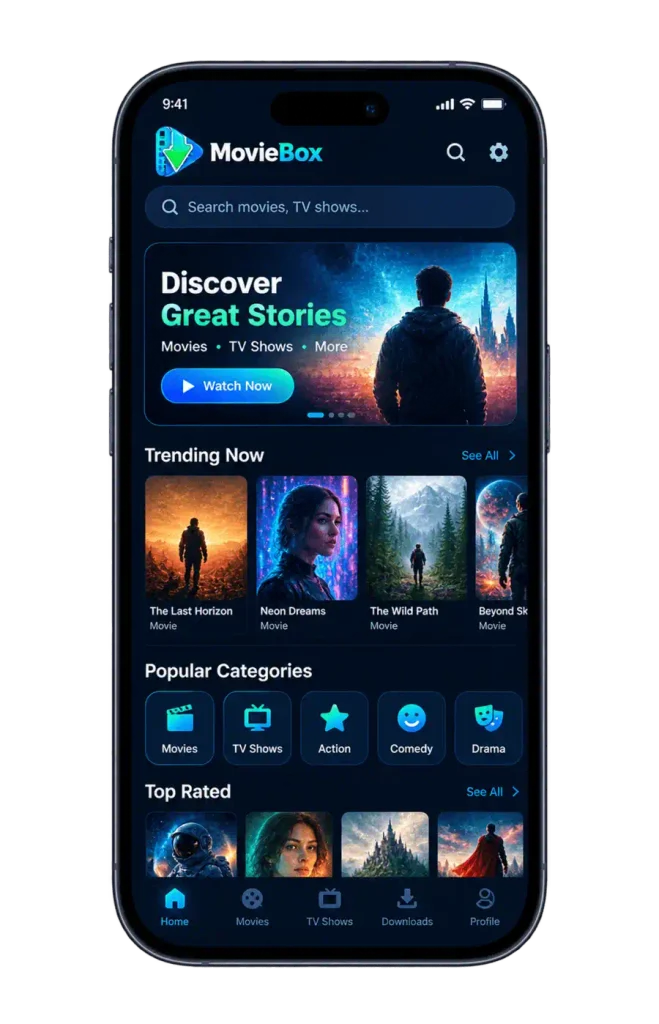
Moviebox is an entertainment app where users can watch movies, TV shows, and other videos. This app brings different types of entertainment into one simple place. You can explore action movies, comedy shows, dramas, and many other categories. The interface is simple and makes finding videos quite easy. Many users prefer this app because it offers free streaming options. You can watch different videos without changing between many apps. The moviebox apk is mainly used on supported Android devices. It also offers downloading options for watching videos without internet. Users can explore different titles and find something for their free time. The app includes useful options for watching videos in different quality settings. These small features make the watching experience more comfortable for many users.
Many people use Moviebox because it provides entertainment in one place. You can search for movies or explore shows through different categories. The moviebox mod apk is another version searched by Android users. Some modified versions offer fewer advertisements and other changed features. However, these extra options can differ between modified app files. Users also search for moviebox download when looking for the Android application. The app has a simple layout with different sections for videos. You can open a movie and choose the available playback options. Some videos also include subtitles for easier understanding of different languages. Many users like having movies and shows together in one application. It makes regular watching simple without moving through many different platforms
| Feature | Details |
|---|---|
| App Name | MovieBox |
| Version | Latest Version |
| Size | 71.3 MB |
| Category | Entertainment / Streaming |
| Compatibility | Android & PC |
| Price | Free |
| Updated | 1 Hour Ago… |
What is the Moviebox App?
Moviebox is a video streaming application made for watching different entertainment content. It brings movies, television shows, and other videos into one place. You can explore titles from different genres using the available categories. The movie box apk works mainly through compatible Android phones and tablets. Users can select a video and start watching with an internet connection. The application also provides download options for certain available videos. Through this, users can watch saved content when internet is unavailable. Some people use the app for movies, while others explore television series. The simple interface helps users move between different sections without much trouble. You can also search directly when you already know a movie name. This makes finding familiar titles easier for regular users.
The app works by showing available videos inside its main interface. Users can browse the library and open titles they want. The moviebox app for android apk is used for this purpose. Many users install it because they want simple entertainment access. You can find different video categories and explore them at your own pace. The movie box mod apk is also mentioned across different download websites. These modified files may include changes to advertisements or other app settings. Another search term is movibox apk, which users sometimes use for Moviebox. The normal application already includes several useful features for watching videos. Its streaming and download options make watching more flexible on Android devices. The app is used for entertainment during breaks and other free hours.
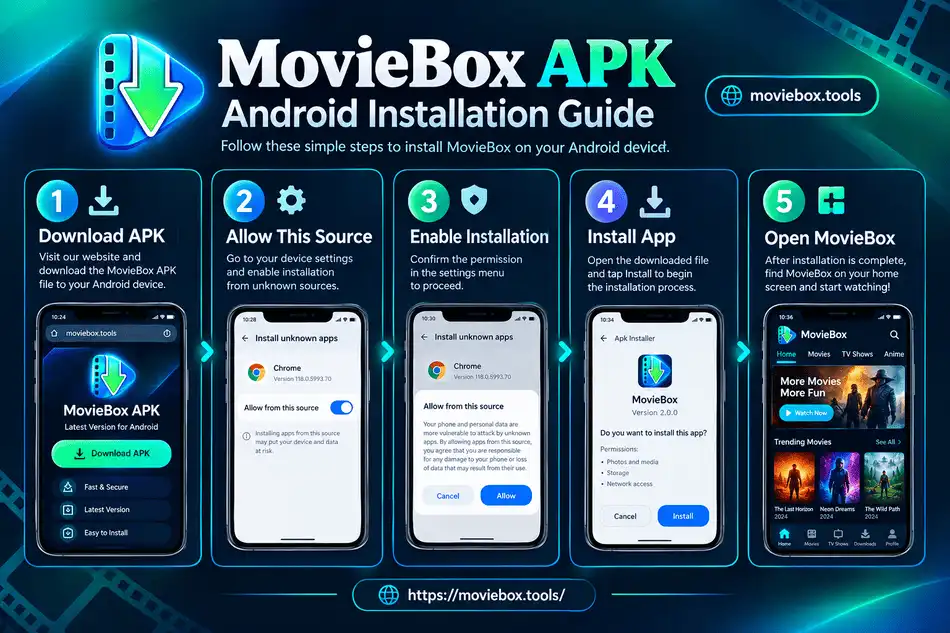
How to Download, Install, and Use Moviebox?
- Open the browser on your Android mobile device.
- Find the official or trusted MovieBox download page.
- Select the Android APK file from the download section.
- Wait until the file finishes downloading to your device.
- Open your Downloads folder and locate the downloaded file.
- Check the file source and scan it before installation.
- If Android requests permission, review the source and allow it only if you trust the file.
- Tap Install and wait for the installation process to finish.
- Open MovieBox from the application menu on your phone.
- Browse the available movie and television show categories.
- Select a video and choose an available playback quality.
- Use offline downloads only when the app supports them and you have permission to download the content.
Features of Moviebox
Pros and Cons of Moviebox
Pros of MovieBox
Key benefits and features
- ✓Offers free access to various movies and TV shows.
- ✓Features a simple and clean user interface.
- ✓Includes different movie and TV show categories.
- ✓Provides a search feature to find titles easily.
- ✓Offers streaming quality options for some videos.
- ✓Supports offline viewing for downloadable videos.
- ✓Provides subtitle options for selected titles.
- ✓Lets users explore multiple TV episodes in one place.
- ✓Includes simple video playback controls.
- ✓Offers a mobile-friendly interface for Android devices.
- ✓Brings different entertainment categories into one app.
- ✓May support both online streaming and offline playback.
Cons of MovieBox
Important limitations to consider
- ×Is not available through the Google Play Store.
- ×Some versions may display advertisements.
- ×Streaming performance depends on internet speed.
- ×Subtitle availability may vary between videos.
- ×Modified APK files may carry security and privacy risks.
- ×Some Android devices may experience playback issues.
Moviebox vs Netflix
Moviebox and Netflix are two applications used for watching entertainment content. Both apps provide movies and television shows through their streaming interfaces. However, they work in different ways and offer different viewing options. Moviebox provides free entertainment access through its Android application. Netflix uses paid subscriptions for accessing its licensed entertainment library. Users searching for moviebox mod apk latest version may also compare streaming features. The movieboxtv mod and movie box v4 searches reflect interest in other Moviebox builds. These differences make both applications useful for comparison.
| Feature | MovieBox | Netflix |
|---|---|---|
| Streaming Access | Free access claimed | Paid subscription |
| Google Play Store | Not generally available | Available in supported regions |
| Android Installation | May require an APK | Official app installation |
| Advertisements | May appear | Depends on the plan |
| Offline Downloads | Depends on the app version | Available for supported titles |
| Original Productions | Not verified | Netflix Originals |
| Official App Support | Depends on the source | Official app support |
| Children’s Profiles | Not verified | Available |
| Smart TV Support | Compatibility may vary | Supported devices vary by model |
| Content Licensing | Licensing is unclear | Licensed content |
Moviebox provides free entertainment access without requiring a paid streaming subscription. You can explore different movies and television shows through its interface. The application also provides download options for some available video titles. This makes offline watching possible when an internet connection is not available. Netflix also supports offline downloads, but access requires an active subscription. Moviebox uses APK installation because it is unavailable on Google Play. Netflix can be installed directly through supported official application stores. Both apps provide video playback controls and different entertainment categories. The available content and viewing options are different between these two applications.
Moviebox Alternatives
Moviebox is used for watching movies and television shows on Android devices. Some users also explore other applications with similar entertainment features. People searching for moviebox mod apk, moviebox download, or moviebox tv mod may look for different streaming platforms. Several applications provide movies, television series, and other entertainment content. These apps have different libraries, playback options, and device support.
1. Tubi
Tubi is a free streaming application that provides movies and television shows. You can explore different entertainment categories through its simple interface. The application includes action movies, comedy shows, dramas, and other content. Users can watch available videos without paying a monthly subscription. However, advertisements appear during some movies and television programs. Tubi also supports different mobile devices and smart television platforms. Like Moviebox, it provides different entertainment titles in one application. The main difference is its licensed content library and official app support.
2. Pluto TV
Pluto TV is another application used for watching free entertainment content. It provides live television channels alongside movies and other available shows. You can explore different channels without purchasing a regular television subscription. The app also includes on-demand content for watching selected video titles. Advertisements help keep the free streaming service available for users. Unlike Moviebox, Pluto TV focuses strongly on live television channels. Users can browse entertainment through its channel guide and content categories. The available shows and channels can differ between different countries.
3. Plex
Plex is a media application that provides movies and television shows. It also allows users to organize and watch their personal media collection. You can explore free streaming content through its available entertainment library. The application includes live television channels with different types of programs. Some free videos include advertisements during regular watching sessions. Plex supports Android phones, computers, and several television streaming devices. Moviebox mainly focuses on entertainment access through its video collection. Plex also includes tools for managing personal movies and other media.
4.Netflix
Netflix is a streaming application that provides movies and television series. You can explore different entertainment categories through its main interface. The platform also includes original movies and shows made for subscribers. Users need an active subscription to access its available streaming content. Netflix supports Android phones, smart televisions, computers, and other compatible devices. Some subscription plans also allow users to download selected videos. Moviebox offers free streaming access through a different application system. Netflix provides licensed entertainment with regular official updates and support. Both applications allow users to search for movies and shows.
FAQs About Moviebox
01
What is MovieBox?
MovieBox is an entertainment application for watching movies and television shows. It provides different video categories through a simple streaming interface. Users can explore available content on supported devices.
02
Is MovieBox free to use?
MovieBox may offer free access to various entertainment titles and streaming options. However, some versions may display advertisements or include usage limits. Available features can vary between application builds.
03
Is MovieBox safe for Android devices?
MovieBox safety depends on the APK file and its source. Unofficial files may contain unwanted changes or harmful software. Therefore, check app permissions, scan downloaded files, and avoid untrusted websites.
04
Can I download movies using MovieBox?
Some MovieBox versions provide download options for selected movies and television shows. Supported downloads may allow offline viewing without an internet connection. Availability depends on the content and application version.
05
Does MovieBox work on Android TV?
Some MovieBox builds may work on compatible Android TV devices. However, certain versions may not support TV screens or remote controls properly. Check device compatibility before installing the application.
06
Why is MovieBox not available on Google Play Store?
MovieBox may be distributed through APK files outside the Google Play Store. Its absence does not confirm a specific reason for its unavailability. Always review the source carefully before installing an unofficial application.
07
Does MovieBox require root access?
Standard APK installation usually does not require root access on Android. However, your device may ask you to allow installation from an external source. Rooting is generally unnecessary for basic installation.
08
How can I update MovieBox?
Check the application’s trusted source for available updates. Before downloading, verify the source and review the file details. Avoid installing unknown modified APKs, as they may create security or compatibility issues.
Conclusion
Moviebox is an entertainment application that provides different movies and television shows. It brings several types of video content into one simple place. You can explore different categories and find titles through its search option. The app also includes playback controls for watching videos more comfortably. Users can adjust available streaming quality depending on their internet connection. Some videos also provide subtitle options for understanding different languages. The moviebox apk is mainly used on compatible Android devices. It provides both online viewing and download options for supported content. Many users explore this application because of its free entertainment access. The interface keeps different movie categories easy to find and open. You can move between movies and television shows without changing applications. These features make the app useful for regular entertainment browsing.
Moviebox is an entertainment application that provides different movies and television shows. It brings several types of video content into one simple place. You can explore different categories and find titles through its search option. The app also includes playback controls for watching videos more comfortably. Users can adjust available streaming quality depending on their internet connection. Some videos also provide subtitle options for understanding different languages. The moviebox apk is mainly used on compatible Android devices. It provides both online viewing and download options for supported content. Many users explore this application because of its free entertainment access. The interface keeps different movie categories easy to find and open. You can move between movies and television shows without changing applications. These features make the app useful for regular entertainment browsing.
